tbdflow-ui: a desktop dashboard built with hica
30 Jun 2026hica recently got initial package management, and I wanted to build something meaningful to put it to practise. I’ve added examples and working programs to the repo, but I wanted a real showcase using the imgui library. tbdflow was the obvious candidate.
tbdflow needed structured JSON output first, otherwise IPC would have meant brittle string parsing. Adding --json also improved the overall developer experience: if you use tbdflow in scripts or have a Genie committing code through it, you get machine-readable output instead of human-readable text. Supported by info, status, radar, sync, recover --list, task show, and note --show.
The commands work great in the terminal. But sometimes you just want to glance at a repository’s health without switching context, a quick ambient read. That peripheral awareness is important for comprehension, especially across multiple repos (teams should really be on a monorepo, but that’s a separate post).
The result is tbdflow-ui: a persistent three-panel desktop window that sits alongside your editor and keeps the workflow visible.
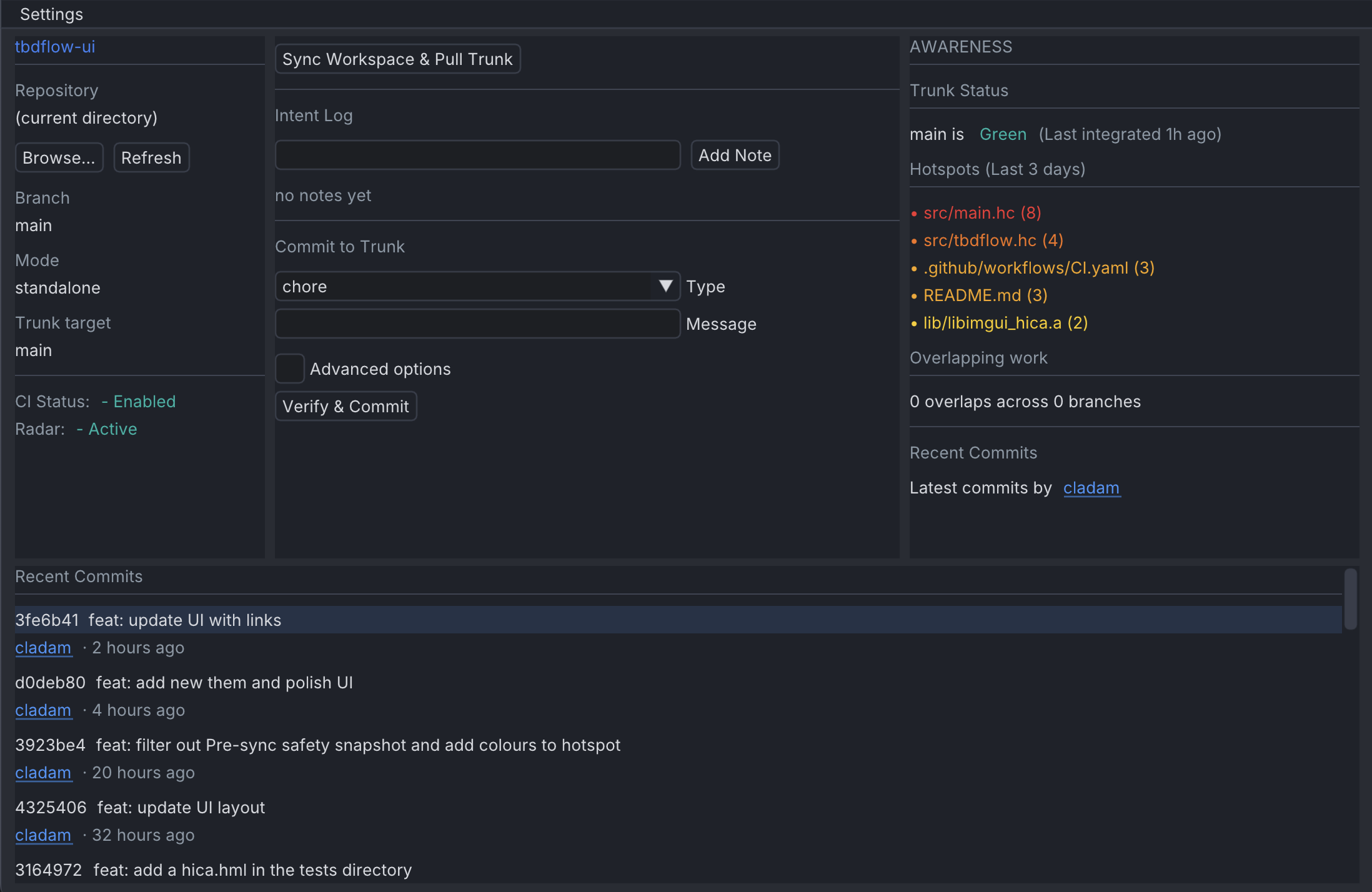
What it does
The window is organised into three panels.
The left panel is your context: which repo you’re in, which branch, whether CI is enabled, whether radar is active. A quick glance tells you where you are and whether the trunk is healthy.
The centre panel is where the work happens. Sync with one click. The Intent Log is right in front: type a note, press Add Note, it calls tbdflow note "<text>" and the log refreshes immediately. The breadcrumb is the point: reasoning is sharpest at the moment you write the code, and a field sitting in front of you captures it before the next context switch. Rules that rely on documenting something later don’t have the same pull. I wrote about the underlying risk in The Comprehension Crisis. Below that is the commit form: a type dropdown populated from your repo’s tbdflow --json info config and a message. There is an Advanced toggle for the rest of the supported options.
The right panel provides Awareness: trunk status with a colour-coded signal (green, pending, red), churn hotspots from the last three days highlighted on a red-to-yellow scale, and an overlap count across active branches.
It also supports multiple repos. Click Browse, pick a directory, all panels reload. Handy if you’re switching between a few repos throughout the day.
The design rule
There’s one rule the UI follows strictly: the CLI is the source of truth.
tbdflow-ui never touches Git directly. Every piece of data comes from tbdflow --json <command>. The commit button constructs a full tbdflow commit -t <type> -m "<message>" command string and executes it. The intent log reads from tbdflow --json notes. Radar reads from tbdflow --json radar.
This matters because it means the UI can never drift out of sync with the CLI’s logic. If tbdflow adds a new commit flag tomorrow, the UI gets it by passing through the JSON output, not by reimplementing the logic.
Why a desktop app?
A terminal is perfect when you’re actively working. A desktop window serves a different purpose. It provides ambient awareness: trunk health, overlaps, hotspots, and your current intent are visible without interrupting your flow. The goal wasn’t to replace the CLI, but to complement it.
Built with hica
This is the part that interests me most, because tbdflow-ui is written in hica, my own functional, expression-based language.
hica transpiles to Koka, and Koka compiles to C. So the pipeline for tbdflow-ui is:
.hc → hica → .kk → Koka → C → native binary
For a CLI tool, that pipeline is fairly unremarkable. For a GUI app with Dear ImGui, it gets more interesting. ImGui is a C++ immediate-mode GUI library. Getting hica to talk to it meant building a thin C FFI layer that exposes ImGui’s widgets as plain C functions, then wrapping those in a hica imgui library.
The result is that the hica source looks like this:
fun render_sidebar_context(c: Config, s: Status) {
  label("Branch")
  gui_text(s.current_branch)
  gui_spacing()

  label("Mode")
  gui_text(c.mode)
  gui_spacing()

  label("CI Status:")
  gui_same_line()
  if c.ci_check_enabled {
    gui_text_colored("- Enabled", 0.06, 0.71, 0.65, 1.0)
  } else {
    gui_text_colored("o Disabled", 0.94, 0.33, 0.31, 1.0)
  }
}
No FFI boilerplate in application code. No pointer management, no widget IDs, no frame-begin/frame-end ceremony. hica’s effect system means the rendering context flows implicitly; IO effects are tracked at the type level without being specified on every function.
The commit command builder is a good example of how hica code reads. It’s purely functional: a chain of string conditionals that assembles the final shell command:
pub fun build_commit_cmd(ctype: string, msg: string, scope: string, body: string,
                         tag: string, issue: string, breaking: bool, no_verify: bool) {
  let base = "tbdflow commit -t " + ctype + " -m \"" + msg + "\""
  let s1 = if scope != ""   { base + " -s " + scope }             else { base }
  let s2 = if body  != ""   { s1   + " --body \"" + body + "\"" } else { s1 }
  let s3 = if tag   != ""   { s2   + " --tag " + tag }            else { s2 }
  let s4 = if issue != ""   { s3   + " --issue " + issue }        else { s3 }
  let s5 = if breaking      { s4   + " --breaking" }              else { s4 }
  let s6 = if no_verify     { s5   + " --no-verify" }             else { s5 }
  s6
}
Pure functions with clear data flow and no side effects until exec() is called.
The hica imgui library
One thing I really like is the theming. Since the entire rendering surface is a hica module, I can write themes as plain hica files:
pub fun apply_theme() {
  gui_set_color_text(0.9333, 0.9411, 0.9529)
  gui_set_color_bg(0.0941, 0.1098, 0.1451)
  gui_set_color_accent(0.2314, 0.5098, 0.9647)
  gui_set_color_plot(0.0588, 0.7098, 0.6549)
  gui_set_style_rounding(4.0, 4.0, 4.0)
  gui_set_style_spacing(8.0, 6.0, 16.0)
}
Drop a different theme file in, call a different function. The app ships with a “Stillness Dark / Nordic Blue” theme and a One Dark Pro theme. Switching is one function call. The imgui library has a theme-editor if you want to create your own themes.
What this means for hica
tbdflow-ui is the most complete application I’ve built with hica so far, and hica itself didn’t require any language changes to build it. The language was already capable. What did evolve was the imgui FFI library: tbdflow-ui had requirements the earlier layer didn’t cover, so those gaps got filled as the application needed them.
That’s a healthy feedback loop. A real program with real requirements is a better driver for a library than designing the API in the abstract.
The takeaway is that hica can build real desktop GUI applications. A tool with multiple data sources, reactive panels, live CLI integration, clipboard access, hyperlinks, and two polished themes. The C FFI story works. The linking story works (Koka link flags for C++ static libs with --cclinkopts=-lc++). It compiles to a single native binary.
Try it
curl -fsSL https://github.com/cladam/tbdflow-ui/releases/latest/download/install.sh | sh
Pre-built for macOS ARM64 and Linux x86_64. Requires tbdflow v0.33.0+ and SDL2 on your system.
If you want to build from source, install hica and run hica run in the repo root.
- tbdflow-ui source - MIT licensed
- tbdflow - the CLI this wraps
- hica - the language it’s written in
This is an early release. tbdflow-ui will be improved continuously.
Throughput is a safety feature!