<?xml version="1.0" encoding="utf-8"?><feed xmlns="http://www.w3.org/2005/Atom" ><generator uri="https://jekyllrb.com/" version="3.10.0">Jekyll</generator><link href="https://cladam.github.io/feed.xml" rel="self" type="application/atom+xml" /><link href="https://cladam.github.io/" rel="alternate" type="text/html" /><updated>2026-05-07T19:09:22+00:00</updated><id>https://cladam.github.io/feed.xml</id><title type="html">Claes Adamsson</title><subtitle>A personal site for projects, documentation, and thoughts on software development and delivery.
</subtitle><author><name>Claes Adamsson</name><email>claes.adamsson@gmail.com</email></author><entry><title type="html">Rebuilding GNU ls in Koka</title><link href="https://cladam.github.io/2026/05/06/koka-ls-clone/" rel="alternate" type="text/html" title="Rebuilding GNU ls in Koka" /><published>2026-05-06T00:00:00+00:00</published><updated>2026-05-06T00:00:00+00:00</updated><id>https://cladam.github.io/2026/05/06/koka-ls-clone</id><content type="html" xml:base="https://cladam.github.io/2026/05/06/koka-ls-clone/"><![CDATA[<p>In a <a href="https://cladam.github.io/2026/04/06/koka-development/">previous post</a>, I introduced <a href="https://koka-lang.github.io/koka/doc/index.html">Koka</a> and why I started porting <code class="language-plaintext highlighter-rouge">ls</code> to it. But I never wrote about the actual backstory.</p>

<p>I stumbled onto Koka in my GitHub feed and it immediately got me hooked. This sentance alone is golden – “Koka is a strongly typed functional-style language with effect types and handlers that transpiles to C11”.</p>

<p>Right around then, I saw a LinkedIn post where someone had built a parallel <code class="language-plaintext highlighter-rouge">ls</code> in modern C++ and tagged <a href="https://codingchallenges.fyi/">John Cricket</a>, which led me to his coding challenges.</p>

<p>If you really want to learn a language you should be hands-on and do exercises, John has listed several fun and challenging exercises but <code class="language-plaintext highlighter-rouge">ls</code> wasn’t on the list, so that was the one I picked 🙂</p>

<h3 id="the-ambition">The Ambition</h3>

<p>The goal: Rebuild GNU <code class="language-plaintext highlighter-rouge">ls</code> in Koka. 100% byte-for-byte compatible output.</p>

<p>That sounded like “a weekend project, maybe two” until I opened <code class="language-plaintext highlighter-rouge">ls.c</code>… The quick command I run hundred times a day is a 5,000-line beast of C, 83 CLI flags, and decades of accumulated edge cases. It’s a masterpiece of over-engineering, and it’s rock solid.</p>

<h3 id="getting-into-the-guts">Getting Into the Guts</h3>

<p>I’m working against the 9.10 codebase, and the architecture is a four-stage gauntlet: <strong>Setup → Parsing → Execution → Output</strong>.</p>

<p>The setup alone is a 1,000-line jungle of globals and structs. <code class="language-plaintext highlighter-rouge">decode_switches()</code>, the monster that parses options, is nearly 600 lines long!</p>

<p>I have created a couple of notes if people want to learn more about the internals and tips on how to use GNU ls (and my version of course):</p>

<ul>
  <li><a href="https://github.com/cladam/koka-labs/blob/main/docs/decoded-gnu-ls.md">Decoded GNU ls</a> – The architecture walkthrough.</li>
  <li><a href="https://github.com/cladam/koka-labs/blob/main/docs/gnu-ls-columns.md">Column Layout</a> – The math behind <code class="language-plaintext highlighter-rouge">-C</code>.</li>
  <li><a href="https://github.com/cladam/koka-labs/blob/main/docs/gnu-ls-exit-codes.md">Exit Codes</a> – The three states of “oops.”</li>
  <li><a href="https://github.com/cladam/koka-labs/blob/main/docs/gnu-ls-guide.md">Usage Guide</a> – Practical tips for GNU <code class="language-plaintext highlighter-rouge">ls</code>.</li>
  <li><a href="https://github.com/cladam/koka-labs/blob/main/docs/gnu-ls-recursive.md">Recursive Listing</a> – How <code class="language-plaintext highlighter-rouge">-R</code> traverses the tree.</li>
</ul>

<p>The official docs and the <a href="https://www.man7.org/linux/man-pages/man1/ls.1.html">man page</a> are fine for users, but studying the source code is the only way to see how it really works.</p>

<h3 id="the-roadmap">The Roadmap</h3>

<p>I drafted a plan of 6 phases + the infrastructure needed like a testing framwork and proper CI using GitHub Actions.</p>

<ol>
  <li><strong>Phase 1 — Foundation</strong></li>
  <li><strong>Phase 2 — Which files are listed</strong></li>
  <li><strong>Phase 3 — What information is listed</strong></li>
  <li><strong>Phase 4 — Sorting the output</strong></li>
  <li><strong>Phase 5 — General output formatting</strong></li>
  <li><strong>Phase 6 — Formatting the file names</strong></li>
</ol>

<p>To keep myself in check, I have built a test framework (kunit) that diffs my output against the original GNU binary. CI fails immediatly if I’m out of line…</p>

<h3 id="why-koka">Why Koka?</h3>

<p><code class="language-plaintext highlighter-rouge">ls</code> is actually a perfect stress test for Koka’s unique features:</p>
<ul>
  <li><strong>The Effect System:</strong> <code class="language-plaintext highlighter-rouge">ls</code> is a mix of pure logic (sorting/formatting) and messy side effects (disk I/O, <code class="language-plaintext highlighter-rouge">stat()</code> calls). Koka’s effects make that boundary visible in the types.</li>
  <li><strong>Data Modelling:</strong> File types, sort modes, format styles, indicator kinds. The enums in <code class="language-plaintext highlighter-rouge">ls.c</code> map naturally to Koka’s algebraic types.</li>
  <li><strong>Perceus:</strong> This is Koka’s secret weapon. It’s a reference-counting system that allows functional code to perform like C.</li>
  <li><strong>The FFI:</strong> Koka’s standard library is still growing, so I’ve had to write C shims for things like symlink detection. The FFI (Foreign Function Interface) has been surprisingly painless and fun.</li>
</ul>

<h3 id="learning-in-public">Learning in Public</h3>

<p>I’ll be the first to admit: I’m a decent but not pro programmer and a total Koka novice. GNU <code class="language-plaintext highlighter-rouge">ls</code> is not “beginner friendly” territory. The C is dense and Koka’s documentation is still thin compared to other mainstream languages.</p>

<p>I’ve spent a lot of time “rubber-ducking” with a Genie to get through the nuts and bolts, figuring out why <code class="language-plaintext highlighter-rouge">stat()</code> and <code class="language-plaintext highlighter-rouge">lstat()</code> treat symlinks differently, or how <code class="language-plaintext highlighter-rouge">-l</code> is supposed to silently override <code class="language-plaintext highlighter-rouge">-C</code>.</p>

<p>This project doesn’t have a delivery-date. It’s just me, a 40-year-old C program, and a language that really got me hooked. It’s been a blast.</p>

<p>I’m not going to rebuild all of Coreutils, no way. <code class="language-plaintext highlighter-rouge">ls</code> is more than enough. But the process has triggered a different curiosity: I want to build a small language that transpiles to Koka. 🤓
Follow along at <a href="https://github.com/cladam/koka-labs">koka-labs</a>.</p>]]></content><author><name>Claes Adamsson</name><email>claes.adamsson@gmail.com</email></author><category term="koka" /><category term="languages" /><category term="learning" /><category term="coreutils" /><summary type="html"><![CDATA[In a previous post, I introduced Koka and why I started porting ls to it. But I never wrote about the actual backstory.]]></summary></entry><entry><title type="html">A Time Machine for Your Working Directory</title><link href="https://cladam.github.io/2026/04/19/the-wip-guard/" rel="alternate" type="text/html" title="A Time Machine for Your Working Directory" /><published>2026-04-19T00:00:00+00:00</published><updated>2026-04-19T00:00:00+00:00</updated><id>https://cladam.github.io/2026/04/19/the-wip-guard</id><content type="html" xml:base="https://cladam.github.io/2026/04/19/the-wip-guard/"><![CDATA[<p>In a <a href="https://cladam.github.io/2026/04/12/capturing-intent/">previous post</a>, I introduced the Intent Log, a way to
capture the <em>why</em> alongside the <em>what</em> during development. The Intent Log targets and solves a piece of the comprehension problem.
But there’s a related problem it didn’t address: <strong>the safety problem.</strong></p>

<p>In Trunk-Based Development, you sync with the remote constantly. That’s the whole point.
tbdflow is running <code class="language-plaintext highlighter-rouge">git fetch</code> and <code class="language-plaintext highlighter-rouge">git rebase --autostash</code> under the hood and originally I had trust that uncommitted files would stay untouched but there are occasions when this assumption breaks.
If a genie (or even you) runs a <code class="language-plaintext highlighter-rouge">git pull</code> then the work would be gone unless you do the git stash-pull-stash pop loop.</p>

<p>I’ve been building a feature I’m calling <strong>WIP Guard</strong>, a (semi-)continuous, invisible safety snapshots that give you a time
machine for your working directory.</p>

<h2 id="the-three-ways-work-gets-lost">The three ways work gets lost</h2>

<p>There are three scenarios that keep developers anxious in a high-frequency integration workflow:</p>

<ol>
  <li>
    <p><strong>The buried stash.</strong> A rebase fails. Git auto-stashed your changes, but the stash is now tangled in a half-applied
rebase. Less experienced developers might panic and even experienced ones will lose minutes untangling it.</p>
  </li>
  <li>
    <p><strong>The accidental overwrite.</strong> A developer runs <code class="language-plaintext highlighter-rouge">git stash pop</code> or <code class="language-plaintext highlighter-rouge">git pull</code> manually after a failed <code class="language-plaintext highlighter-rouge">tbdflow sync</code>.
The previous working state is gone.</p>
  </li>
  <li>
    <p><strong>The context gap.</strong> You wrote a breadcrumb with <code class="language-plaintext highlighter-rouge">tbdflow + "trying trait-based approach"</code> twenty minutes ago. But
the <em>code</em> that inspired that thought? It only exists in your working directory, which has since moved on. The note
is orphaned from the state it describes.</p>
  </li>
</ol>

<p>WIP Guard solves all three.</p>

<h2 id="how-it-works-git-stash-create">How it works: <code class="language-plaintext highlighter-rouge">git stash create</code></h2>

<p>The key insight is that Git already has a mechanism for creating immutable snapshots of your working directory:
<code class="language-plaintext highlighter-rouge">git stash create</code>. Unlike a regular <code class="language-plaintext highlighter-rouge">git stash</code>, this command:</p>

<ul>
  <li>Creates a commit object representing your index and working tree</li>
  <li>Does <strong>not</strong> add it to the stash reflog (so it can’t interfere with your manual stashes)</li>
  <li>Produces an immutable hash that stays in the Git object store until garbage collection (typically 14–30 days)</li>
</ul>

<p>WIP Guard calls <code class="language-plaintext highlighter-rouge">git stash create</code> silently at strategic moments and stores the resulting hash in the Intent Log.
It doesn’t introduce any new concepts, just using standard Git and much more manageable.</p>

<h2 id="the-four-hooks">The four hooks</h2>

<p>WIP Guard is “continuous” because it hooks into commands you’re already running. I didn’t want to add a new command, rather integrate it as helpful magic.</p>

<h3 id="hook-a-the-intent-hook">Hook A: The Intent Hook</h3>

<p>Every time you record a breadcrumb with <code class="language-plaintext highlighter-rouge">tbdflow +</code>, the CLI now captures a snapshot alongside the note:</p>

<div class="language-plaintext highlighter-rouge"><div class="highlight"><pre class="highlight"><code>$ tbdflow + "factory pattern is too complex, switching to traits"
Note recorded: "factory pattern is too complex, switching to traits"
WIP snapshot: a7b8c9d0e1
</code></pre></div></div>

<p>That hash is stored inside the note object in <code class="language-plaintext highlighter-rouge">.tbdflow-intent.json</code>. The breadcrumb is
a thought <em>linked to the exact code that inspired it</em>. You can go back to the code as it was at the moment of
realisation.</p>

<h3 id="hook-b-the-sync-hook">Hook B: The Sync Hook</h3>

<p>Before <code class="language-plaintext highlighter-rouge">tbdflow sync</code> initiates a rebase, it now does two things:</p>

<ol>
  <li>
    <p><strong>Anti-collision check.</strong> It verifies that <code class="language-plaintext highlighter-rouge">.git/REBASE_HEAD</code>, <code class="language-plaintext highlighter-rouge">.git/MERGE_HEAD</code>, and <code class="language-plaintext highlighter-rouge">.git/CHERRY_PICK_HEAD</code> don’t
exist. If a git operation is already in progress, tbdflow halts and tells you to resolve it first. This alone
prevents a whole class of “Git ghost” states.</p>
  </li>
  <li>
    <p><strong>Pre-sync snapshot.</strong> Regardless of whether you’ve added notes, tbdflow captures a safety snapshot and stores it as
<code class="language-plaintext highlighter-rouge">last_sync_snapshot</code> in the intent log. If the rebase goes sideways, your pre-rebase state is one command away.</p>
  </li>
</ol>

<h3 id="hook-c-the-radar-hook">Hook C: The Radar Hook</h3>

<p><code class="language-plaintext highlighter-rouge">tbdflow radar</code> already scans for overlapping work on remote branches. Now it also silently captures a snapshot if your
working directory is dirty and the last snapshot is more than 30 minutes old. This catches the case where a developer is
heads-down coding and hours pass between syncs.</p>

<h3 id="hook-d-the-undo-hook">Hook D: The Undo Hook</h3>

<p>This one is easy to overlook. <code class="language-plaintext highlighter-rouge">tbdflow undo</code> is the “panic button”. It checks out main, fast-forwards, and reverts a
commit. That’s a destructive sequence for your working directory. If you had uncommitted changes on a feature branch
when you hit the panic button, they’d be gone.</p>

<p>Now, <code class="language-plaintext highlighter-rouge">tbdflow undo</code> captures a snapshot and runs the same anti-collision check before doing anything. The panic button
has its own safety catch.</p>

<h2 id="the-escape-hatch-tbdflow-recover">The escape hatch: <code class="language-plaintext highlighter-rouge">tbdflow recover</code></h2>

<p>All of this snapshotting would be pointless without a clean recovery path. That’s <code class="language-plaintext highlighter-rouge">tbdflow recover</code>:</p>

<div class="language-plaintext highlighter-rouge"><div class="highlight"><pre class="highlight"><code>$ tbdflow recover --list
Available WIP snapshots:
  #     Type       Timestamp              Note                                     Hash
  ------------------------------------------------------------------------------------------
  1     intent     2026-04-18T14:15:00     trying trait-based approach              a7b8c9d0e1
  2     intent     2026-04-18T14:42:00     added error variants                     f2e3d4c5b6
  3     pre-sync   2026-04-18T15:01:00     Pre-sync safety snapshot                 e1f2g3h4i5
</code></pre></div></div>

<p>To restore:</p>

<div class="language-plaintext highlighter-rouge"><div class="highlight"><pre class="highlight"><code>$ tbdflow recover 1
Warning: This will apply the snapshot over your current working directory.
Snapshot applied successfully.
The snapshot remains available for future recovery.
</code></pre></div></div>

<p>Note that we use <code class="language-plaintext highlighter-rouge">git stash apply</code>, not <code class="language-plaintext highlighter-rouge">git stash pop</code>. The snapshot commit stays in the Git store. You can apply it
again if needed. The snapshot is immutable which means you can’t accidentally destroy your safety net.</p>

<h2 id="the-lifecycle-what-happens-when-you-commit">The lifecycle: what happens when you commit?</h2>

<p>So what happens when you commit? If snapshots live in the Intent Log, and the Intent Log gets consumed by <code class="language-plaintext highlighter-rouge">tbdflow commit</code>, don’t the
snapshots disappear?</p>

<p>Yes they do, and that’s by design. The commit is the lifecycle boundary. Once your work is committed and pushed to trunk, it’s
in git history. The snapshots have served their purpose. When tbdflow clears the intent log after a successful push, it
tells you:</p>

<div class="language-plaintext highlighter-rouge"><div class="highlight"><pre class="highlight"><code>Releasing 3 WIP snapshot(s) — your work is now in git history.
Intent log consumed and cleared.
</code></pre></div></div>

<p>The Git objects themselves aren’t deleted, they linger in the object store until garbage collection. But the references
are gone, and that’s fine. Your work is safe in a commit now.</p>

<p>There’s an important subtlety here: <strong>this only happens on trunk commits.</strong> If you’re committing to a feature branch,
the intent log (and all its snapshots) are preserved. The safety net stays up until your work reaches main.</p>

<h2 id="the-stale-branch-guard">The stale-branch guard</h2>

<p>One important safety detail: if you switch branches and try to recover a snapshot from a different branch context,
tbdflow warns you:</p>

<div class="language-plaintext highlighter-rouge"><div class="highlight"><pre class="highlight"><code>Stale intent log detected: notes were captured on 'feat/auth', but you are now on 'main'.
</code></pre></div></div>

<p>This prevents the subtle mistake of applying a snapshot from one feature’s context onto another feature’s working
directory.</p>

<h2 id="why-this-matters-for-tbd-adoption">Why this matters for TBD adoption</h2>

<p>The number one objection I hear when advocating for Trunk-Based Development is: <strong>“What if I lose my work?”</strong></p>

<p>It’s a fair concern. In a branch-heavy workflow, your feature branch is your safety net. You can push half-finished work
to a remote branch and it’s backed up. In TBD, your work-in-progress lives locally until it’s ready for trunk. That’s a
trust gap.</p>

<p>WIP Guard closes that gap. Every breadcrumb you drop, every sync you run, every radar scan — they all leave behind an
immutable snapshot of your working directory. Your work is preserved automatically, without you doing anything different
from what you’d normally do.</p>

<p>The recovery path is one command, not a Stack Overflow deep-dive into <code class="language-plaintext highlighter-rouge">git reflog</code> and <code class="language-plaintext highlighter-rouge">git fsck</code>.</p>

<h2 id="try-it">Try it</h2>

<p>WIP Guard is available now. If you’re already using the Intent Log, you get snapshots for free — just keep using
<code class="language-plaintext highlighter-rouge">tbdflow +</code> as you work. If something goes wrong, <code class="language-plaintext highlighter-rouge">tbdflow recover --list</code> shows you what’s available.</p>

<p>Give it a try: <a href="https://github.com/cladam/tbdflow">tbdflow on GitHub</a>.</p>

<blockquote>
  <p><em>Throughput is a safety feature!</em></p>
</blockquote>]]></content><author><name>Claes Adamsson</name><email>claes.adamsson@gmail.com</email></author><category term="DevOps" /><category term="tbdflow" /><category term="tbd" /><category term="safety" /><summary type="html"><![CDATA[In a previous post, I introduced the Intent Log, a way to capture the why alongside the what during development. The Intent Log targets and solves a piece of the comprehension problem. But there’s a related problem it didn’t address: the safety problem.]]></summary></entry><entry><title type="html">Capturing Intent Before the Commit</title><link href="https://cladam.github.io/2026/04/11/capturing-intent/" rel="alternate" type="text/html" title="Capturing Intent Before the Commit" /><published>2026-04-11T00:00:00+00:00</published><updated>2026-04-11T00:00:00+00:00</updated><id>https://cladam.github.io/2026/04/11/capturing-intent</id><content type="html" xml:base="https://cladam.github.io/2026/04/11/capturing-intent/"><![CDATA[<p>In previous posts, I’ve talked about the <a href="https://cladam.github.io/2026/02/22/the-comprehension-crisis/">Comprehension Crisis</a>: the risk that as we move faster, especially with AI agents, we lose the “why” behind our code. A <code class="language-plaintext highlighter-rouge">git diff</code> tells you what changed. It says nothing about what was tried and rejected. It’s a record of the result, but it deletes the tries and struggles.</p>

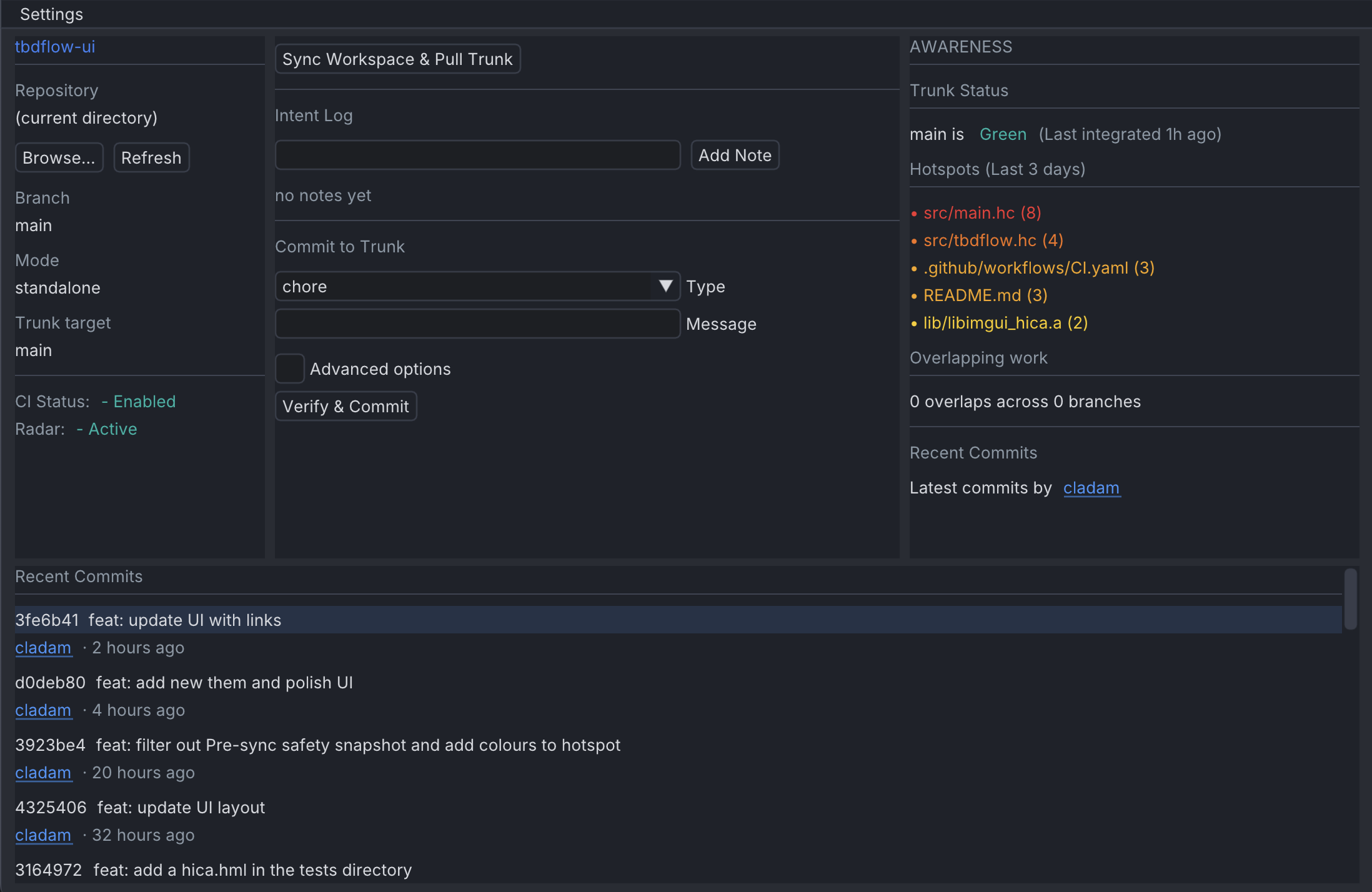
<p>I’ve been exploring a new feature in <code class="language-plaintext highlighter-rouge">tbdflow</code> to bridge that gap: the <strong>Intent Log</strong>.</p>

<p>The goal is pretty simple (but ambitious). I want to capture the developer’s (or agent’s) reasoning while it’s fresh, without adding the documentation tax that usually kills these efforts.</p>

<h3 id="low-friction-breadcrumbs">Low friction breadcrumbs</h3>

<p>For many of us, jotting things down is a vital mechanism for staying in flow. We need to leave breadcrumbs to maintain context as we navigate complex problems.</p>

<p>The problem I see isn’t the act of writing; it’s the friction of the “diary.” We don’t want to leave our environment to update a formal document or a separate ticket. We want to capture those internal realisations or “failed tries” directly in the stream of work.</p>

<p>To solve this, I’ve added two ways to log a breadcrumb during development:</p>

<div class="language-bash highlighter-rouge"><div class="highlight"><pre class="highlight"><code>tbdflow note &lt;message&gt;             <span class="c"># Log a note</span>
tbdflow + &lt;message&gt;                <span class="c"># Shorthand alias</span>
</code></pre></div></div>

<p>With <code class="language-plaintext highlighter-rouge">+</code>, the friction is close to zero. No shell escaping, no context switching, no separate file to manage. It also works directly without doing <code class="language-plaintext highlighter-rouge">task start &lt;description&gt;</code>.</p>

<h3 id="the-discipline">The discipline</h3>

<p>I’ve added breadcrumb instructions to both tbdflow <code class="language-plaintext highlighter-rouge">SKILL.md</code> and <code class="language-plaintext highlighter-rouge">AGENTS.md</code>, they are good instructions so same rules should apply whether you’re a human or an AI agent working in the repo:</p>

<ul>
  <li>Drop a breadcrumb whenever you change approach or reject an alternative.</li>
  <li>Before a complex commit, there should be at least one or two breadcrumbs explaining major decisions.</li>
  <li>Do not wait until commit time — log as you go.</li>
</ul>

<p>The point is that reasoning captured after the fact is reconstruction. Reasoning captured in the moment is evidence. The intent log only works if the habit is there.</p>

<h3 id="the-lifecycle-of-a-thought">The lifecycle of a thought</h3>

<p>The Intent Log follows a strict lifecycle designed to keep the repository clean while enriching the history.</p>

<p><strong>Capture:</strong> The first time you use a note command, <code class="language-plaintext highlighter-rouge">tbdflow</code> creates a local <code class="language-plaintext highlighter-rouge">.tbdflow-intent.json</code>. This file is automatically added to <code class="language-plaintext highlighter-rouge">.gitignore</code> so it never accidentally hits the trunk.</p>

<p><strong>Tasks:</strong> For more structured work, you can use <code class="language-plaintext highlighter-rouge">tbdflow task start "Refactor auth logic"</code>. This sets a high-level context that all subsequent notes are attached to.</p>

<p><strong>Integrate:</strong> When you run <code class="language-plaintext highlighter-rouge">tbdflow commit</code>, the CLI reads your notes and injects them into the body of the commit message, positioned before any breaking change or TODO footers.</p>

<p><strong>Cleanup:</strong> Once the commit is pushed to the trunk, the local JSON file is deleted. The reasoning is preserved in git history, but the workspace is reset.</p>

<h3 id="handling-branch-drift">Handling branch drift</h3>

<p>One challenge with local logging is branch switching. If you start a task on a feature branch and switch to a hotfix, your notes shouldn’t follow you blindly.</p>

<p><code class="language-plaintext highlighter-rouge">tbdflow</code> now tracks branch ownership in the intent log. If you try to add a note on a different branch than where you started, the CLI will warn you:</p>

<div class="language-bash highlighter-rouge"><div class="highlight"><pre class="highlight"><code>Stale intent log detected: notes were captured on <span class="s1">'feat/auth'</span>, but you are now on <span class="s1">'main'</span><span class="nb">.</span>
</code></pre></div></div>

<p>If you explicitly start a new task on the new branch, <code class="language-plaintext highlighter-rouge">tbdflow</code> will rebind the existing notes to the new context. The developer is always aware of which stream their thoughts belong to.</p>

<h3 id="why-this-helps-with-tbd-adoption">Why this helps with TBD adoption</h3>

<p><strong>Context for the auditor.</strong> In a Non-blocking Review, the code is already integrated. The auditor needs to know the intent to verify whether the implementation matches the goal. Seeing that a developer tried and rejected a pattern saves the auditor from suggesting the same thing. Hopefully it turns into a knowledge-sharing moment.</p>

<p><strong>Agent transparency.</strong> When an AI agent is working, it can use the <code class="language-plaintext highlighter-rouge">+</code> shorthand to think out loud. The human developer can see the agent’s reasoning before the final commit is pushed. It turns the agent from a black box into a transparent colleague.</p>

<p><strong>Fighting cognitive atrophy.</strong> By capturing these notes, the history of the struggle isn’t lost. Anyone picking up a task or reverting a change can see the decision-making process.</p>

<h3 id="the-result">The result</h3>

<p>The Intent Log captures metadata at the point of creation. It requires zero context-switching and provides value during the post-integration audit.</p>

<p>It makes for a more honest git history where the “why” is just as accessible as the “what.”</p>

<p>If you want to see how the Intent Log formats the final commit message, <code class="language-plaintext highlighter-rouge">tbdflow</code> includes a <code class="language-plaintext highlighter-rouge">--dry-run</code> flag that prints it before execution. You can read more about why I believe dry-runs are essential for workflow tools <a href="https://cladam.github.io/2025/08/23/dry-run/">here</a>.</p>

<p>Give it a try and let me know if the workflow fits you and your team: <a href="https://github.com/cladam/tbdflow">tbdflow on GitHub</a>.</p>

<blockquote>
  <p><em>Throughput is a safety feature!</em></p>
</blockquote>]]></content><author><name>Claes Adamsson</name><email>claes.adamsson@gmail.com</email></author><category term="DevOps" /><category term="tbdflow" /><category term="tbd" /><category term="culture" /><summary type="html"><![CDATA[In previous posts, I’ve talked about the Comprehension Crisis: the risk that as we move faster, especially with AI agents, we lose the “why” behind our code. A git diff tells you what changed. It says nothing about what was tried and rejected. It’s a record of the result, but it deletes the tries and struggles.]]></summary></entry><entry><title type="html">Porting Coreutils to Koka</title><link href="https://cladam.github.io/2026/04/06/koka-development/" rel="alternate" type="text/html" title="Porting Coreutils to Koka" /><published>2026-04-06T00:00:00+00:00</published><updated>2026-04-06T00:00:00+00:00</updated><id>https://cladam.github.io/2026/04/06/koka-development</id><content type="html" xml:base="https://cladam.github.io/2026/04/06/koka-development/"><![CDATA[<p>I like to explore different programming languages, and I often try them out but most of them ends up as a “Hello World” in a folder I never reopen, digital fossils of a Saturday afternoon curiosity… 
My actual day-to-day has been settled for a while: Kotlin when I’m building for the web, Rust when I need a CLI tool. I do think about them a lot, but their syntax, semantics, and functionality don’t tickle me the same way anymore.</p>

<p>Then Koka came along…</p>

<h3 id="why-koka">Why Koka</h3>

<p>It’s a research language from Microsoft Research. Functional, but not in the way that usually makes me bounce off after an afternoon.</p>

<p>The dot selection syntax was the first thing that felt right. Coming from Kotlin, I’m used to chaining: <code class="language-plaintext highlighter-rouge">names.filter(is-hidden).sort(cmp).foreach(println)</code>. Koka lets me write like that. No inside-out nesting. Data flows left to right, which is how I think about it anyway.</p>

<p>But what really got me was the effect system. In most languages, a function signature tells you what goes in and what comes out. In Koka, it also tells you what the function <em>does</em>. A signature like <code class="language-plaintext highlighter-rouge">fn(path) -&gt; &lt;fsys,exn&gt; list&lt;string&gt;</code> says: this touches the filesystem and might throw. It’s right there on the tin and not buried in documentation.</p>

<p>The compiler enforces it. There is no way to sneak in a side-effect, type systems are great like that. It’s “honest programming” in a way.</p>

<h3 id="porting-ls">Porting <code class="language-plaintext highlighter-rouge">ls</code></h3>

<p>I don’t learn languages from tutorials. I need a real problem. So I started <a href="https://github.com/cladam/koka-labs">koka-labs</a>, where I’m porting <code class="language-plaintext highlighter-rouge">ls</code> and <code class="language-plaintext highlighter-rouge">wc</code> from GNU Coreutils. First up: <code class="language-plaintext highlighter-rouge">ls</code>.</p>

<p><code class="language-plaintext highlighter-rouge">ls</code> looks simple. List files, print strings. But a proper implementation touches a lot:</p>

<ul>
  <li><strong>Sorting</strong> I had to write an insertion sort to be able to reverse sort and get a feel of how <code class="language-plaintext highlighter-rouge">Koka</code> handles recursion.</li>
  <li><strong>File metadata</strong> Hidden files, permissions, timestamps. This is where I’ll hit the boundary between pure logic and actual OS interaction, that will be fun when I get to more “advanced” listing.</li>
  <li><strong>Perceus</strong> Koka’s reference counting system. This is what makes functional code run at speeds you wouldn’t expect from a language without manual memory management.</li>
</ul>

<p>Working through it piece by piece, following the GNU philosophy, has been a good way to see how Koka keeps things clean while dealing with the mess of a real operating system.</p>

<p>I have even done some C to implement missing features in stdlib needed for <code class="language-plaintext highlighter-rouge">ls -F</code>. This was super-easy, I created a C file in the same directory with a couple of small functions and then it was just to import and wire it up.</p>

<div class="language-c highlighter-rouge"><div class="highlight"><pre class="highlight"><code><span class="c1">// Import my C code</span>
<span class="k">extern</span> <span class="n">import</span>
  <span class="n">c</span> <span class="n">file</span> <span class="s">"fs-inline.c"</span>

<span class="c1">// C FFI</span>
<span class="k">extern</span> <span class="n">is</span><span class="o">-</span><span class="n">symlink</span><span class="p">(</span><span class="n">p</span> <span class="o">:</span> <span class="n">string</span><span class="p">)</span> <span class="o">:</span> <span class="n">fsys</span> <span class="n">bool</span>
  <span class="n">c</span> <span class="s">"kk_os_is_symlink"</span>
</code></pre></div></div>

<h3 id="what-stands-out-so-far">What stands out so far</h3>

<p>The effect system changes how I structure code. When side effects are visible in the types, separatng pure logic from IO becomes natural. The language makes that the easiest path.</p>

<p>Perceus is the other thing, functional languages have a reputation for being slow or memory-hungry. Koka’s approach to reference counting gives you immutability without the usual performance cost.</p>

<h3 id="no-rush">No rush</h3>

<p>There’s no timeline on this, and no requirements. Just a compiler and a rabbit hole. I’ll keep porting tools and writing about what I find.</p>

<p>The repo is public if you want to follow along.</p>]]></content><author><name>Claes Adamsson</name><email>claes.adamsson@gmail.com</email></author><category term="koka" /><category term="languages" /><category term="learning" /><summary type="html"><![CDATA[I like to explore different programming languages, and I often try them out but most of them ends up as a “Hello World” in a folder I never reopen, digital fossils of a Saturday afternoon curiosity… My actual day-to-day has been settled for a while: Kotlin when I’m building for the web, Rust when I need a CLI tool. I do think about them a lot, but their syntax, semantics, and functionality don’t tickle me the same way anymore.]]></summary></entry><entry><title type="html">Beyond the Branch: The Social Fabric of Trunk-Based Development</title><link href="https://cladam.github.io/2026/04/03/beyond-the-branch/" rel="alternate" type="text/html" title="Beyond the Branch: The Social Fabric of Trunk-Based Development" /><published>2026-04-03T00:00:00+00:00</published><updated>2026-04-03T00:00:00+00:00</updated><id>https://cladam.github.io/2026/04/03/beyond-the-branch</id><content type="html" xml:base="https://cladam.github.io/2026/04/03/beyond-the-branch/"><![CDATA[<p>When discussing Trunk-Based Development (TBD), we often get bogged down in the mechanics: the branching strategy, the CI speed, or the revert logic. But as a colleague recently pointed out to me, moving away from Pull Requests (PRs) is a <strong>“drastic change”</strong> that impacts more than just Git history. It impacts the social fabric of the team.</p>

<p>The common fear is that without the “gate” of a PR, we lose our collective understanding of the repository. We worry that Seniors will lose sight of what Juniors are doing, and that the codebase will suffer from a form of cognitive atrophy.</p>

<p>In reality, safety in TBD does not come from the gate. It comes from moving from <strong>Gatekeeping</strong> to <strong>Continuous Inspection.</strong></p>

<h3 id="the-fallacy-of-the-gatekeeper">The Fallacy of the Gatekeeper</h3>

<p>The Pull Request model assumes that awareness happens at the point of the merge. We believe that because three people looked at a 400-line diff, the team now “understands” the change.</p>

<p>In practise, this often creates a false sense of security. PRs frequently become bottlenecks where Seniors, overwhelmed by volume, perform a “rubber-stamp” review just to unblock a teammate. I explored this dynamic in more detail in <a href="https://cladam.github.io/2026/02/19/the-pull-request-trap/">The Pull Request Trap</a>. This is where cognitive atrophy actually starts: when the review becomes a chore rather than a conversation.</p>

<p>TBD takes a different approach. By removing the block, we encourage the team to find more disciplined, continuous ways to share knowledge.</p>

<h3 id="an-iteration-in-the-life-of-a-tbd-team">An Iteration in the Life of a TBD Team</h3>

<p>To understand how this works, we have to look past the commands and see how the team actually interacts throughout a typical iteration of work.</p>

<h4 id="the-morning-the-social-radar">The Morning: The Social Radar</h4>

<p>In a PR-heavy world, you start your day by checking a backlog of notifications. In a TBD team, you start by looking at the stream.</p>

<p><strong>The Sync:</strong> A developer runs <code class="language-plaintext highlighter-rouge">tbdflow sync</code>. Instead of a blind pull, the tool checks the CI status of the trunk. If it is red, they wait. This simple check prevents the “Monday Morning” frustration of pulling a broken build and spending an hour debugging someone else’s mistake.</p>

<p><strong>The Radar:</strong> A Senior engineer runs <code class="language-plaintext highlighter-rouge">tbdflow radar</code>. They notice a Junior is currently touching a sensitive auth module. Instead of waiting for a PR two days later, the Senior reaches out immediately: <em>“I see you’re in the auth logic; let’s pair for twenty minutes on the error handling.”</em></p>

<p>Knowledge is shared <strong>before</strong> the code is even committed, not as a post-hoc correction.</p>

<h4 id="the-work-executable-standards">The Work: Executable Standards</h4>

<p>TBD requires a high level of discipline. We replace the “PR Template” with an executable <em>Definition of Done</em> (DoD).</p>

<p>As the team works in small, atomic batches, <code class="language-plaintext highlighter-rouge">tbdflow commit</code> presents an interactive checklist. <em>“Did you add tests?” “Is the documentation updated?”</em> This moves the “manual checks” from a document no one reads into a CLI flow no one can ignore. The machine checks the machine, ensuring that only “Done” code reaches the trunk.</p>

<h4 id="the-afternoon-the-audit-loop">The Afternoon: The Audit Loop</h4>

<p>This is where the collective understanding is maintained. In TBD, we practise <strong>Non-blocking Reviews (NBR).</strong></p>

<p>The Senior spends thirty minutes reviewing the day’s “Digest.” They see a commit that is already live and passing tests. They notice a slight architectural misalignment. Instead of blocking the developer’s momentum, they raise a concern.</p>

<p>The Junior isn’t stopped. They simply integrate the Senior’s feedback into their next “fix-forward” commit. The learning loop is measured in hours, not days. The Junior grows faster because they are constantly receiving small, digestible pieces of feedback rather than a massive “Request Changes” dump at the end of a task.</p>

<h3 id="continuous-inspection-over-gatekeeping">Continuous Inspection over Gatekeeping</h3>

<p>The “drastic change” of TBD is moving from a world of <strong>Checkpoints</strong> to a world of <strong>Streams.</strong></p>

<p>PRs ensure people have <em>“seen”</em> the code, but TBD ensures people are <strong>aligned</strong> with the code. By integrating in tiny batches, the “target” for review is smaller and harder for bugs to hide in. By using tools like <code class="language-plaintext highlighter-rouge">radar</code> and <code class="language-plaintext highlighter-rouge">review --digest</code>, the team maintains a constant, peripheral awareness of the whole repository.</p>

<blockquote>
  <p>TBD doesn’t remove the team’s responsibility to understand the codebase. It just provides a faster, more honest way to achieve it.</p>
</blockquote>

<p>Using <code class="language-plaintext highlighter-rouge">tbdflow</code> is entirely optional. The tool is built on standard <code class="language-plaintext highlighter-rouge">git</code> and <code class="language-plaintext highlighter-rouge">gh</code> CLI commands, and you can always perform these actions manually. If you want to look under the hood to see exactly how it works, <code class="language-plaintext highlighter-rouge">tbdflow</code> includes a <code class="language-plaintext highlighter-rouge">--dry-run</code> flag that prints every underlying command before it runs. You can read more about why I believe dry-runs are essential for workflow tools, <a href="https://cladam.github.io/2025/08/23/dry-run/">Looking under the hood with a dry-run</a>.</p>

<blockquote>
  <p><em>Throughput is a safety feature!</em></p>
</blockquote>]]></content><author><name>Claes Adamsson</name><email>claes.adamsson@gmail.com</email></author><category term="DevOps" /><category term="tbdflow" /><category term="TBD" /><category term="culture" /><summary type="html"><![CDATA[When discussing Trunk-Based Development (TBD), we often get bogged down in the mechanics: the branching strategy, the CI speed, or the revert logic. But as a colleague recently pointed out to me, moving away from Pull Requests (PRs) is a “drastic change” that impacts more than just Git history. It impacts the social fabric of the team.]]></summary></entry><entry><title type="html">The Panic Button for Trunk-Based Development</title><link href="https://cladam.github.io/2026/03/04/tbd-panic-button/" rel="alternate" type="text/html" title="The Panic Button for Trunk-Based Development" /><published>2026-03-04T00:00:00+00:00</published><updated>2026-03-04T00:00:00+00:00</updated><id>https://cladam.github.io/2026/03/04/tbd-panic-button</id><content type="html" xml:base="https://cladam.github.io/2026/03/04/tbd-panic-button/"><![CDATA[<p>Trunk-Based Development is designed for speed. It removes waiting and keeps integration continuous. Code moves to the trunk quickly, often within minutes.</p>

<p>But fast integration has a requirement: the trunk must stay green.</p>

<p>Anyone who has pushed a commit to <code class="language-plaintext highlighter-rouge">main</code>, seen CI fail, and realised the rest of the team is now blocked knows the situation.</p>

<p>In TBD, the rule is simple: <strong>Fix it or revert it.</strong></p>

<p>Speed only works when recovery is just as fast as integration.</p>

<h3 id="the-friction-of-manual-reverts">The friction of manual reverts</h3>

<p>In theory, <code class="language-plaintext highlighter-rouge">git revert</code> is simple. In practise, doing it while the team is waiting introduces unnecessary friction.</p>

<p>When the trunk is broken, you typically need to:</p>

<ul>
  <li>Make sure you are on <code class="language-plaintext highlighter-rouge">main</code></li>
  <li>Pull the latest changes so you are not reverting on a stale head</li>
  <li>Find the correct SHA</li>
  <li>Run the revert</li>
  <li>Resolve any metadata or message issues</li>
  <li>Push the change</li>
</ul>

<p>None of this is complicated. But under time pressure, small mistakes happen. A wrong SHA, a stale branch, a revert on the wrong base.</p>

<p>The time saved by skipping a Pull Request can quickly turn into time spent stabilising the trunk.</p>

<h3 id="introducing-tbdflow-undo">Introducing <code class="language-plaintext highlighter-rouge">tbdflow undo</code></h3>

<p>With version 0.22, I added a simple command:</p>

<div class="language-bash highlighter-rouge"><div class="highlight"><pre class="highlight"><code>tbdflow undo &lt;sha&gt;
</code></pre></div></div>

<p>It is intentionally opinionated, the command is built for reliability.</p>

<p>When you run it, <code class="language-plaintext highlighter-rouge">tbdflow</code>:</p>

<ul>
  <li>Syncs with the remote trunk to ensure your local state is current</li>
  <li>Verifies that the provided SHA exists on the trunk</li>
  <li>Performs a clean revert with a conventional commit message</li>
  <li>Pushes the revert immediately</li>
</ul>

<p>The goal is simple: remove the friction when you need the trunk green again, fast.</p>

<h3 id="fast-recovery-enables-fast-integration">Fast recovery enables fast integration</h3>

<p>Teams are often cautious about Trunk-Based Development because the <code class="language-plaintext highlighter-rouge">main</code> branch feels exposed.</p>

<p>In practise, safety in TBD does not come from gates. It comes from fast feedback and fast correction.</p>

<p>If reverting is easy and predictable, the cost of a mistake drops significantly. That lowers hesitation. Smaller commits feel safer. Integration stays frequent.</p>

<p><code class="language-plaintext highlighter-rouge">tbdflow undo</code> is a small feature, but it reinforces an important principle:</p>

<p><strong>Continuous integration only works when continuous recovery is equally simple.</strong></p>

<p>Version 0.22 is available now.
You can read more in the <a href="https://github.com/cladam/tbdflow#undo">GitHub documentation</a> or explore how this fits with non-blocking reviews and post-integration audits.</p>

<blockquote>
  <p><em>Throughput is a safety feature!</em></p>
</blockquote>]]></content><author><name>Claes Adamsson</name><email>claes.adamsson@gmail.com</email></author><category term="DevOps" /><category term="tbdflow" /><category term="TBD" /><summary type="html"><![CDATA[Trunk-Based Development is designed for speed. It removes waiting and keeps integration continuous. Code moves to the trunk quickly, often within minutes.]]></summary></entry><entry><title type="html">The Comprehension Crisis</title><link href="https://cladam.github.io/2026/02/22/the-comprehension-crisis/" rel="alternate" type="text/html" title="The Comprehension Crisis" /><published>2026-02-22T00:00:00+00:00</published><updated>2026-02-22T00:00:00+00:00</updated><id>https://cladam.github.io/2026/02/22/the-comprehension-crisis</id><content type="html" xml:base="https://cladam.github.io/2026/02/22/the-comprehension-crisis/"><![CDATA[<p>When we talk about the current AI surge, the conversation almost always centres on output.</p>

<p>More code produced per hour. Faster delivery cycles. Higher individual throughput. The charts from major LLM providers suggest a world where the “cost of intelligence” is dropping at an extraordinary pace.</p>

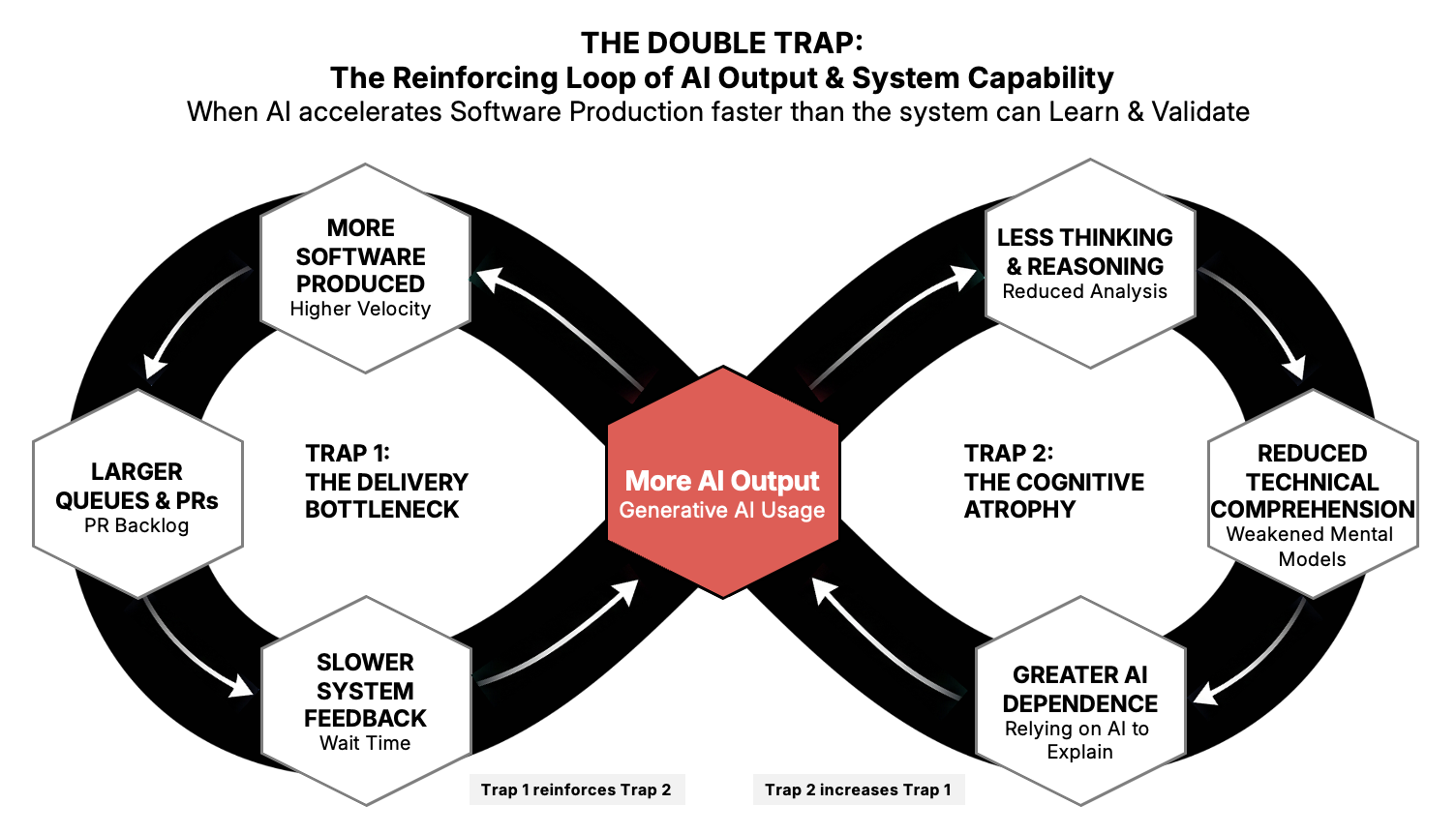
<p>But having spent years working in and observing how systems and teams actually perform, I’m increasingly concerned that we are optimising the wrong end of the pipeline. We are so focused on output that we are neglecting comprehension: the thinking, understanding, and learning that happen before a single line is written.</p>

<p>When reasoning and problem-solving become cheap and instantly available, we can produce solutions faster than we can understand them.
The problem is not necessarily incorrect output, but a gradual loss of understanding about why things work and where they might fail.</p>

<p>I’ve started thinking of this as cognitive atrophy.</p>

<h3 id="the-feedback-loop-of-understanding">The feedback loop of understanding</h3>

<p>In DevOps terms, using AI to bypass deep thought is similar to automating a deployment pipeline without understanding the delivery system behind it. You may get a short-term increase in speed, but you weaken the feedback loops that build long-term capability.</p>

<p>When we consistently outsource the act of thinking, we slowly lose the ability to reason deeply about the work itself. The output may look technically correct, but our internal mental model of why it works (and where it might fail) becomes thinner over time.</p>

<p>AI is excellent at removing productive friction. But in engineering, friction is often where learning happens. Wrestling with a difficult bug, tracing a production incident, or working through an architectural trade-off is how intuition and system understanding are built.</p>

<p>If a model generates the design, the code, and even the explanation, it becomes easy to move work forward without ever really owning the logic. The system looks faster, while the capability inside the system quietly degrades.</p>

<h3 id="when-solutions-become-cheap">When solutions become cheap</h3>

<p>This is also changing what experience and seniority mean, it used to be easy to recognise seniority in the ability to implement solutions quickly and confidently. With AI support, that signal becomes weaker. The difficult part is no longer producing a solution, but deciding whether the solution makes sense in the system it will live in.</p>

<p>AI can generate plausible answers almost instantly, but plausibility is not the same as fit. Deciding what belongs in a particular system still requires an understanding of constraints, history, and trade-offs.</p>

<p>These are the kinds of decisions that teams already deal with:</p>

<ul>
  <li>deciding where to reduce batch size</li>
  <li>choosing what to automate first</li>
  <li>balancing short-term speed with long-term stability</li>
  <li>understanding system constraints and unintended consequences</li>
</ul>

<p>These capabilities don’t disappear with AI. If anything, they become the main source of advantage.</p>

<h3 id="using-ai-without-losing-comprehension">Using AI without losing comprehension</h3>

<p>Avoiding cognitive atrophy requires being intentional about how we integrate AI into daily work.
Here are a few principles that I’ve found to be useful:</p>

<p><strong>Start with the problem</strong>
Before using AI, articulate the problem yourself. Define constraints, risks, and desired outcomes. This mirrors understanding your value stream before optimising it.
If you cannot explain the problem clearly, the solution will not be trustworthy.</p>

<p><strong>Treat AI as an accelerator</strong>
Let it draft, explore, and suggest. Keep ownership of structure, decisions, and logic. If you can’t explain the solution without the tool, you don’t truly own it.</p>

<p><strong>Optimise for learning</strong>
In DevOps we know that speed without feedback creates instability. The same applies cognitively. If throughput rises while learning falls, we are accumulating technical and human debt.</p>

<h3 id="capability-and-comprehension">Capability and comprehension</h3>

<p>AI will unquestionably increase delivery capacity.
But faster output does not automatically translate into stronger capability. A team can move quickly while its understanding of the system gradually becomes thinner.</p>

<p>Adopting the tool is easy. Preserving and growing the capability to understand the result is harder, and that is where the real advantage lies.</p>]]></content><author><name>Claes Adamsson</name><email>claes.adamsson@gmail.com</email></author><category term="DevOps" /><category term="comprehension" /><category term="learning" /><category term="AI" /><summary type="html"><![CDATA[When we talk about the current AI surge, the conversation almost always centres on output.]]></summary></entry><entry><title type="html">The Pull Request Trap</title><link href="https://cladam.github.io/2026/02/19/the-pull-request-trap/" rel="alternate" type="text/html" title="The Pull Request Trap" /><published>2026-02-19T00:00:00+00:00</published><updated>2026-02-19T00:00:00+00:00</updated><id>https://cladam.github.io/2026/02/19/the-pull-request-trap</id><content type="html" xml:base="https://cladam.github.io/2026/02/19/the-pull-request-trap/"><![CDATA[<p>Most developers recognise the “waiting room” of software development. The code is written, the tests are green, and the change is ready. Then you hit <code class="language-plaintext highlighter-rouge">git push</code>, open a Pull Request (PR), and the work stops moving, and then the wait begins.
For many developers, the time spent waiting for reviews exceeds the time spent writing the change.</p>

<p>In many teams, PRs have become the standard way of working. They are introduced to improve quality, but they also introduce waiting and hand-offs that slow integration. Over time, the workflow itself becomes the constraint. If you are trying to pass <a href="https://cladam.github.io/projects/the-claes-test/">The Claes Test</a>, especially Question 11 (CI/CD) and Question 7 (Collaboration), the pull request process may be what is holding you back.</p>

<h3 id="the-hidden-cost-of-the-gatekeeper">The Hidden Cost of the “Gatekeeper”</h3>

<p>The PR model introduces several costs that are easy to overlook but directly conflict with a high-throughput culture.</p>

<p><strong>Wait time</strong></p>

<p>This is pure queue time. In a PR workflow, the gap between “code complete” and “code integrated” stretches into hours or days. In a healthy TBD system, it is measured in seconds, or at least minutes.</p>

<p><strong>Context switching</strong></p>

<p>Developers don’t sit idle. They start something new while waiting. When the feedback finally arrives, they must drop their current work to revisit old code. 
Their flow is broken repeatadly, it’s a real “flow killer.”</p>

<p><strong>Batching</strong></p>

<p>Because the “transaction cost” of opening a PR is high, developers tend to batch more changes into a single PR. Larger batches are harder to review, harder to test, and riskier to deploy.</p>

<p><strong>A false sense of safety</strong></p>

<p>Many reviews end with a quick “LGTM” under time pressure. The gate exists, but are ceremonial in nature and the signal is weak.
With non-blocking reviews, the code is already live, which raises the bar for real understanding rather than rubber-stamping.</p>

<h3 id="the-ci-efficiency-paradox-do-we-really-test-every-commit">The CI efficiency paradox: “Do we really test every commit?”</h3>

<p>A common objection to true TBD is the perceived cost of running full CI on every small change.
In practice, small increments are far more efficient than large batches.</p>

<p><strong>Human time versus compute time</strong></p>

<p>A developer’s hour costs far more than a CI runner’s hour. Pausing flow to save compute is almost always the wrong trade-off.</p>

<p><strong>Continuous verification</strong></p>

<p>When CI runs in parallel with development, feedback arrives within minutes. Small changes are confirmed before the next task even begins.</p>

<p><strong>Reduced blast radius</strong></p>

<p>When a ten-line commit fails, the fix is immediate and obvious. When a thousand-line PR fails, investigation becomes slow and uncertain.</p>

<p><strong>Incremental testing</strong></p>

<p>Modern pipelines can scope tests to the parts of the system that changed. Small commits allow feedback to stay fast and focused.</p>

<h3 id="why-gates-do-not-automatically-create-quality">Why gates do not automatically create quality</h3>

<p>The industry often assumes that more approval steps lead to safer software but DORA research consistently shows the opposite.</p>

<p>High-performing teams favour lightweight, fast feedback and rapid integration. Heavy approval processes correlate with longer lead times and lower deployment frequency, without improvements in stability.</p>

<table>
  <thead>
    <tr>
      <th style="text-align: left">Metric</th>
      <th style="text-align: left">PR-centric flow</th>
      <th style="text-align: left">Non-blocking flow</th>
    </tr>
  </thead>
  <tbody>
    <tr>
      <td style="text-align: left">Lead time</td>
      <td style="text-align: left">High</td>
      <td style="text-align: left">Low</td>
    </tr>
    <tr>
      <td style="text-align: left">Context switching</td>
      <td style="text-align: left">Frequent</td>
      <td style="text-align: left">Minimal</td>
    </tr>
    <tr>
      <td style="text-align: left">Batch size</td>
      <td style="text-align: left">Large</td>
      <td style="text-align: left">Small</td>
    </tr>
    <tr>
      <td style="text-align: left">Primary quality signal</td>
      <td style="text-align: left">Asynchronous review</td>
      <td style="text-align: left">Automated checks + fast correction</td>
    </tr>
    <tr>
      <td style="text-align: left">DORA performance</td>
      <td style="text-align: left">Lower</td>
      <td style="text-align: left">Higher</td>
    </tr>
  </tbody>
</table>

<p>Quality comes from fast feedback and rapid correction, not from waiting.</p>

<h3 id="a-practical-alternative-pairing-and-non-blocking-reviews">A practical alternative: pairing and non-blocking reviews</h3>

<p>In <code class="language-plaintext highlighter-rouge">tbdflow</code>, the workflow shifts away from PRs as gates and toward continuous integration by default.</p>

<p><strong>Pair or mob programming</strong></p>

<p>Real-time review happens as the code is written. The four-eyes principle is built into the work itself.</p>

<p><strong>Non-blocking reviews</strong></p>

<p>Changes integrate immediately. CI starts at once. Review happens in parallel.
If an issue is found, the team fixes forward.</p>

<p><strong>Atomic commits</strong></p>

<p>When integration is effortless, changes stay small. Small commits are easier to understand, easier to test, and easier to correct.</p>

<h3 id="summary-throughput-is-a-safety-feature">Summary: Throughput is a Safety Feature</h3>

<p>Pull Requests are often treated as a safety mechanism. The assumption is that stopping changes before integration reduces risk.</p>

<p>In practice, safety comes from fast feedback and the ability to correct problems quickly. Systems that integrate continuously tend to detect issues earlier and recover faster.</p>

<p>Removing the PR trap does not remove quality control. It shifts quality into the daily work: small changes, fast feedback, and shared responsibility for the trunk.</p>

<p>That shift is less about tooling and more about how teams work together.</p>]]></content><author><name>Claes Adamsson</name><email>claes.adamsson@gmail.com</email></author><category term="DevOps" /><category term="culture" /><category term="TBD" /><category term="The Claes Test" /><summary type="html"><![CDATA[Most developers recognise the “waiting room” of software development. The code is written, the tests are green, and the change is ready. Then you hit git push, open a Pull Request (PR), and the work stops moving, and then the wait begins. For many developers, the time spent waiting for reviews exceeds the time spent writing the change.]]></summary></entry><entry><title type="html">Locality</title><link href="https://cladam.github.io/2026/02/09/locality/" rel="alternate" type="text/html" title="Locality" /><published>2026-02-09T00:00:00+00:00</published><updated>2026-02-09T00:00:00+00:00</updated><id>https://cladam.github.io/2026/02/09/locality</id><content type="html" xml:base="https://cladam.github.io/2026/02/09/locality/"><![CDATA[<p>In <a href="https://cladam.github.io/projects/the-claes-test/">The Claes Test</a>, I ask a critical question about collaboration:
<strong>Do boundaries get out of the way so teams can solve problems together?</strong> (Question 7).</p>

<p>In many organisations, this box is left unticked. Progress depends on hand-offs, approvals and waiting for other teams, and what is described as “collaboration” often turns into a series of blockers. Autonomy is confused with working in isolation.</p>

<p>To move this from a blank to a tick, we need to understand the concept of <strong>Locality</strong>.</p>

<h3 id="the-standardisation-paradox">The Standardisation Paradox</h3>

<p>A common pushback to Locality is the fear of chaos. If every team has total Locality, won’t they all pick different databases, different auth providers, and different UI buttons? Wouldn’t that hurt the customer experience?.</p>

<p>This is where we must distinguish between <strong>Locality</strong> and <strong>Isolation</strong>. Locality isn’t silofication; it is about having the <strong>authority, capability, and expertise</strong> to satisfy customer needs without being blocked by external dependencies.</p>

<p>I like to use an IKEA analogy here: if you are installing a kitchen, you don’t call a specialist to drill every single hole. You have the tools and the pre-drilled boards to do it yourself. That is Locality. The platform (IKEA) provides the “FIXA” toolset and the pre-measured units (the standards), but you maintain the authority to hang the cabinet yourself.</p>

<h3 id="1-locality-of-authority-vs-locality-of-toil">1. Locality of Authority vs. Locality of Toil</h3>

<p>A common friction point is the belief that a team must build its own infrastructure from scratch to be “autonomous”. That isn’t Locality; that’s <strong>toil</strong>.</p>

<p>True Locality means <strong>decision-making</strong> stays with the team. A platform engineering team provides “guided paths”: automated, self-service workflows that <em>amplify</em> Locality by removing low-value plumbing work.</p>

<p>This maps directly to <strong>Question 11 (CI/CD)</strong>. Locality allows changes to be deployed safely and frequently without waiting for manual hand-offs from an external operations or release team.</p>

<h3 id="2-developer-independence-as-the-metric">2. Developer Independence as the Metric</h3>

<p>Locality exists when a team can own the full application lifecycle without relying on another team to carry out essential work.</p>

<p>If a team has to wait for a central function to provision a database or approve a firewall rule, <strong>Locality is broken</strong>. The boundary has become a blockade.</p>

<p>In a platform-enabled environment, the platform team treats developers as customers, building self-service products that keep teams in the driver’s seat. The platform should also provide <strong>Decision Support:</strong> as not every team is equally strong at engineering and architecture. This is where standardisation helps: the platform provides a <em>standardied, secure, and performant</em> X (compute, storage, database, monitoring, etc) configuration by default. It helps teams move faster by making “expensive mistakes” harder to commit.</p>

<h3 id="3-locality-through-decoupling">3. Locality through Decoupling</h3>

<p>You cannot achieve Locality in a “distributed monolith” where every minor change requires a coordination meeting across multiple teams. Locality is technically supported by a <strong>loosely coupled architecture</strong>.</p>

<p>This ensures the team closest to the service has everything they need: logs, metrics and diagnostics to identify and resolve issues independently (<strong>Question 9: Production Readiness</strong>). If you have to ask another team to access your own production data, you don’t have Locality.</p>

<h3 id="fixing-the-environment">Fixing the Environment</h3>

<p>As I note in the Claes Test, behaviour is a function of both the person and their environment: (\(B = f(P, E)\)).</p>

<p>The question “boundaries don’t block progress” isn’t about collaborating harder; it’s about <strong>fixing the environment</strong>.</p>

<p>By building platforms that enable Locality, we remove the structural friction that prevents teams from being truly autonomous and collaborative.</p>

<p><strong>Locality is about ownership. Platform engineering is what makes that ownership scalable.</strong></p>

<p>Interestingly, Locality is the first of the <strong>Five Ideals of DevOps</strong>. It is not a “nice to have”; it is the structural foundation that enables flow, continuous improvement, psychological safety and real customer focus. The Claes Test is, in many ways, a practical way of measuring whether Locality actually exists inside an organisation.</p>

<p>If boundaries are blocking progress in your organisation, the Claes Test can help you pinpoint where Locality is breaking down.</p>

<p>Take <a href="https://cladam.github.io/projects/the-claes-test/">The Claes Test</a></p>]]></content><author><name>Claes Adamsson</name><email>claes.adamsson@gmail.com</email></author><category term="DevOps" /><category term="culture" /><category term="platform" /><category term="locality" /><category term="The Claes Test" /><summary type="html"><![CDATA[In The Claes Test, I ask a critical question about collaboration: Do boundaries get out of the way so teams can solve problems together? (Question 7).]]></summary></entry><entry><title type="html">The Claes Test</title><link href="https://cladam.github.io/2026/02/06/the-claes-test/" rel="alternate" type="text/html" title="The Claes Test" /><published>2026-02-06T00:00:00+00:00</published><updated>2026-02-06T00:00:00+00:00</updated><id>https://cladam.github.io/2026/02/06/the-claes-test</id><content type="html" xml:base="https://cladam.github.io/2026/02/06/the-claes-test/"><![CDATA[<p>In a <a href="https://cladam.github.io/2025/12/22/lewin-and-devops/">previous post</a>, I talked about Kurt Lewin’s equation: \(B = f(P, E)\).</p>

<p>Behaviour is a function of the Person and their Environment.</p>

<p>When a team is struggling with missed “deadlines”, burnout, or shipping bugs, management usually looks at the <strong>Person</strong>. They hire “rockstars” or mandate “accountability”. They try to change the \(P\).</p>

<p>But changing the \(P\) is an exercise in futility. The \(E\) (the <strong>Environment</strong>) is the lever we actually control.</p>

<p>In 2000, Joel Spolsky gave us the <a href="https://www.joelonsoftware.com/2000/08/09/the-joel-test-12-steps-to-better-code/">Joel Test</a>. It was a brilliant, 12-question metric for the engineering environment. But back then, the environment was mostly about tools: <em>Do you use source control? Do you have a bug database?</em></p>

<p>Today, the tools are table stakes. Our modern bottlenecks are no longer technical; they are cultural and systemic.</p>

<p>I’ve spent some time thinking about what the Joel Test looks like if we apply Lewin’s Equation to 2025. I call it <strong>The Claes Test</strong>, or more formally, <strong>The Developer Culture Test</strong>.</p>

<p>Claes, as in <code class="language-plaintext highlighter-rouge">/klaːs/</code></p>

<h2 id="beyond-intentions">Beyond Intentions</h2>

<p>Most companies “value” psychological safety. Most companies “believe” in growth. But values and beliefs aren’t tangible or directly visible. Behaviour is the real litmus test.</p>

<p>The Claes Test doesn’t ask what you believe. It asks what you <strong>do</strong>.</p>

<p>It’s divided into four environmental pillars. If you can’t answer “Yes” and provide evidence for these 18 points, your \(E\) is likely working against your \(B\).</p>

<h3 id="1-the-foundation-the-safety-net">1. The Foundation (The Safety Net)</h3>

<p>If the environment is built on fear or financial instability, you won’t get innovation. You’ll get self-preservation.</p>

<ol>
  <li><strong>Psychological Safety:</strong> Are post-mortems blameless? Can anyone raise a “stop the line” concern?</li>
  <li><strong>Market-Fair Pay:</strong> Is compensation transparently benchmarked and regularly updated?</li>
  <li><strong>True Flexibility:</strong> Is work measured by outcomes, or by “active” status on Slack?</li>
</ol>

<h3 id="2-clarity--alignment">2. Clarity &amp; Alignment</h3>

<p>Autonomy without clarity is a recipe for chaos.</p>

<ol>
  <li><strong>The “Why”:</strong> Can every engineer explain the customer impact of their current sprint?</li>
  <li><strong>Visible Roadmap:</strong> Is the backlog prioritised, visible, and linked to business goals?</li>
  <li><strong>Direct Communication:</strong> Is there a documented process (like RFCs or ADRs) for technical dissent?</li>
  <li><strong>Cross-Functional Unity:</strong> Do Dev, Ops, and Product solve problems together, or “pass the ticket”?</li>
  <li><strong>Recognised Initiative:</strong> Is work that improves the “commons” (refactoring, tooling) rewarded?</li>
</ol>

<h3 id="3-sustainable-engineering">3. Sustainable Engineering</h3>

<p>This is where we measure the “friction” in your environment. High friction = low throughput.</p>

<ol>
  <li><strong>Operational Readiness:</strong> Is there a mandatory “Definition of Done” for production safety?</li>
  <li><strong>Quality Gates:</strong> Are code reviews and automated testing non-negotiable?</li>
  <li><strong>Continuous Delivery:</strong> Can you deploy safely multiple times a day?</li>
  <li><strong>Humane On-Call:</strong> Is the rotation compensated and followed by a learning review?</li>
  <li><strong>InnerSource:</strong> Is the “silo” gone? Can any team contribute to any codebase?</li>
</ol>

<h3 id="4-growth--progression">4. Growth &amp; Progression</h3>

<p>If the environment doesn’t offer a path forward, the best people will find one that does.</p>

<ol>
  <li><strong>Technical Management:</strong> Do leaders have the depth to be credible partners to the team?</li>
  <li><strong>Transparent Ladder:</strong> Are promotion criteria objective and public?</li>
  <li><strong>Parallel Tracks:</strong> Can a Principal Engineer earn/influence as much as a Head of Engineering?</li>
  <li><strong>Feedback Loops:</strong> Is feedback regular, peer-to-peer, and focused on growth?</li>
  <li><strong>Investment:</strong> Is there a dedicated budget and <em>time</em> for professional development?</li>
</ol>

<h2 id="how-to-use-the-test">How to Use the Test</h2>

<p>The Joel Test was binary. You either did it or you didn’t.</p>

<p>The Claes Test is a mirror.</p>

<p>If you want to understand why your team’s behaviour isn’t meeting expectations, stop looking at the people. Run this test and be honest.</p>

<p><strong>A “yes” requires evidence.</strong> “We try to do this” is a “no.”</p>

<p>When you find the “no”s, you’ve found the friction in your environment. Fix the environment, and the behaviour will follow.</p>

<p>If you want a practical way to do that, run the Claes Test with your team.</p>

<p>It’s designed to surface where your culture is helping, and where it’s holding you back.</p>

<p>Take <a href="https://cladam.github.io/projects/the-claes-test/">The Claes Test</a></p>]]></content><author><name>Claes Adamsson</name><email>claes.adamsson@gmail.com</email></author><category term="DevOps" /><category term="culture" /><category term="team" /><category term="The Claes Test" /><summary type="html"><![CDATA[In a previous post, I talked about Kurt Lewin’s equation: \(B = f(P, E)\).]]></summary></entry></feed>